 +1 (800) 844-6603
 Facebook page






Guides in this section
- How to activate POS & plugin licenses
- Minimum Requirements
- New Store Setup Wizard
- Store configuration
- ORO POS Demo Installation
- Adding sticker printer in ORO POS
- PAX S300 Configuration
- Getting ready for Live system
- Configuring Receipt Printer
- Configuring Kitchen Printer
- Printing barcode labels for products
- Configuring IDTECH SecuRED MSR payment device
- How to setup Caller ID device in Cust Plugin
- Kitchen Display (KDS) Configuration
- Customer Monitor
- Kitchen Item Sticker
- Database setup for Multiple Terminals
- Store sessions, opening and closing store
- Recommended Hardware
Releted Guides
Configuring Cash Drawer
There are two ways a cash drawer can be conennected to a POS terminal
- Printer Connect it to the back of the receipt printer using RJ11 Cable.
- Drawer Trigger Connect directly to the POS terminal using a USB to RJ11 adapter called Drawer trigger.
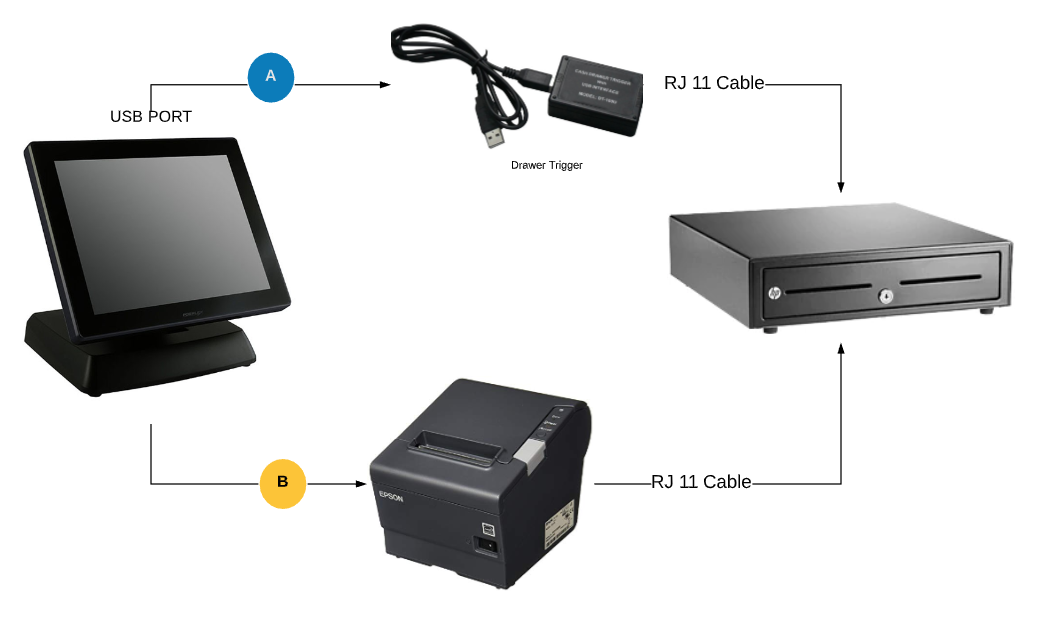
Cash drawer connected to the printer
First set up the printer. Then plug the RJ12 connector cable (the one that looks similar to a phone line) from the cash drawer into the receipt printer. Then go to back-office–> admin–> terminal configuration–> peripherals
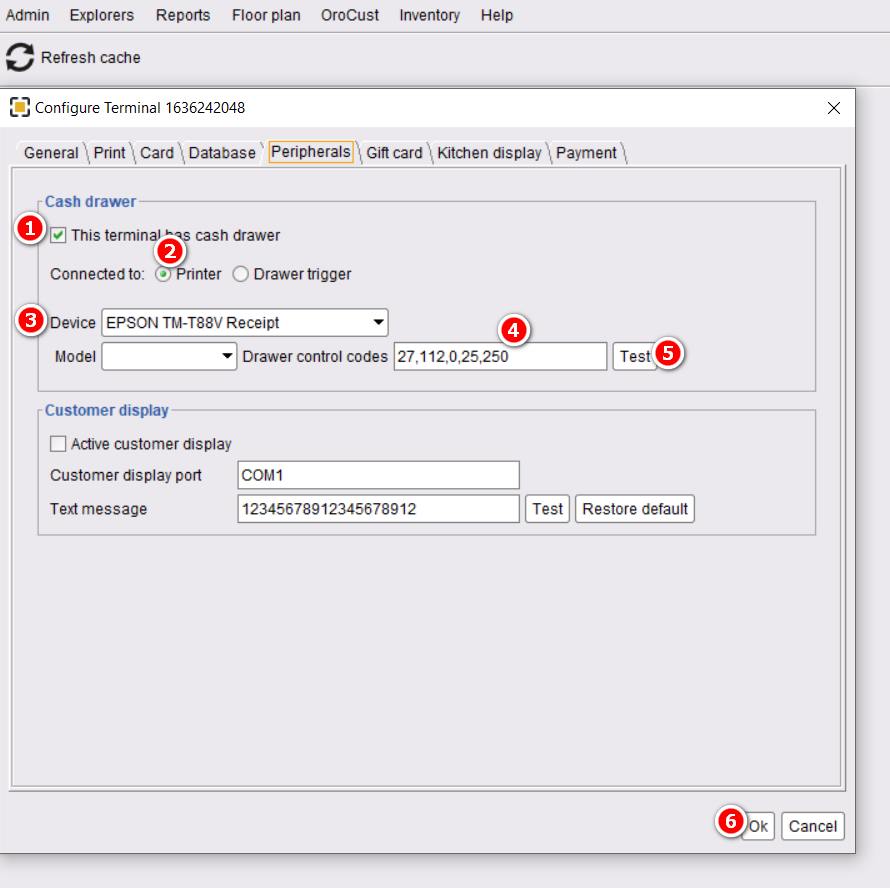
- Select “This terminal has a cash drawer”.
- Select Connected to “Printer”.
- Choose your device.
- Insert the drawer control code 27,112,0,25,250 .
- Test it.
- Click on ok to save it and restart the POS.
Cash drawer connected to the drawer trigger
In ORO POS first method should work in most of the cases. In case store does not use any printer or the printer does not support ESC/POS it can use drawer trigger to kick drawer.
When you install drawer trigger it should create a virtual serial port assigned to the USB port of the drawer trigger. if you are not sure about your port number start the device manager and find out your port number.
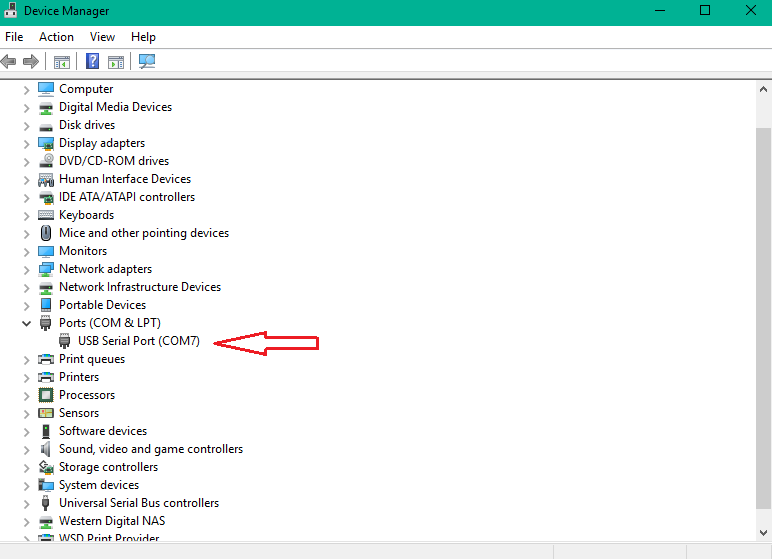
To finish the setup in the POS
Back Office→admin→terminal configuration→peripherals–> drawer trigger
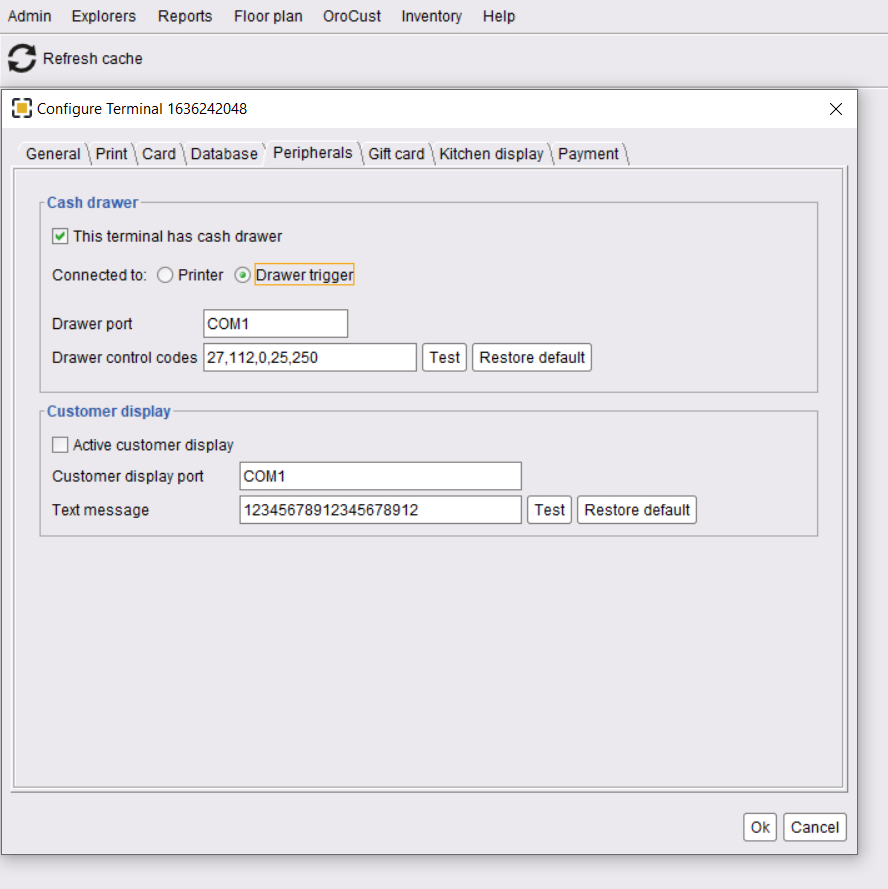
Make sure the virtual serial port is updated and the POS terminal is restarted.
What are those Cash Drawer Code
These codes are special ESC/POS commands and when applied to the RJ11 cable the drawer kicks. These are also known as “Drawer control code”.
The most common code is 27,112,0,25,250 . You can ask your hardware vendor about the drawer control code.
Disclaimer: The information and media included on this website are not legal documents. Whilst we make every attempt to ensure the accuracy and reliability of the information contained in the documents stored, served and accessed on this site, this information should not be relied upon as a substitute for formal advice from our company. Features described in this document are subject to change without any notice.